
Labels and folders
Your labels and folders, as they are. Shared by the whole team.
Trupeo keeps the labels and folders you already use at Gmail, Outlook or your IMAP server. File an email once, and the whole team finds it there.
- No credit card
- Keep your address and your emails
- From €10 a month per mailbox, excl. VAT
How it works
Filed once, found by everyone.
Nothing to migrate
Your Gmail labels and Outlook categories are Trupeo's labels. On an IMAP mailbox, Trupeo keeps the labels and copies them to the server when it can.
Folders on Outlook and IMAP
Move emails into your folders, one at a time or many at once, and manage your folders from Trupeo.
Find any conversation
Search by sender, words, attachment name, date, label, state or who is on it.
Up close
What it looks like in Trupeo.
Real Trupeo screens. The people, the emails and the association are invented.
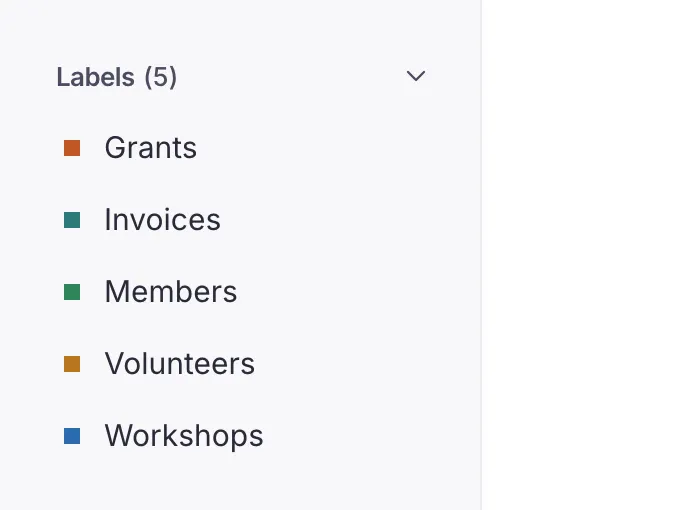
Your labels stay yours
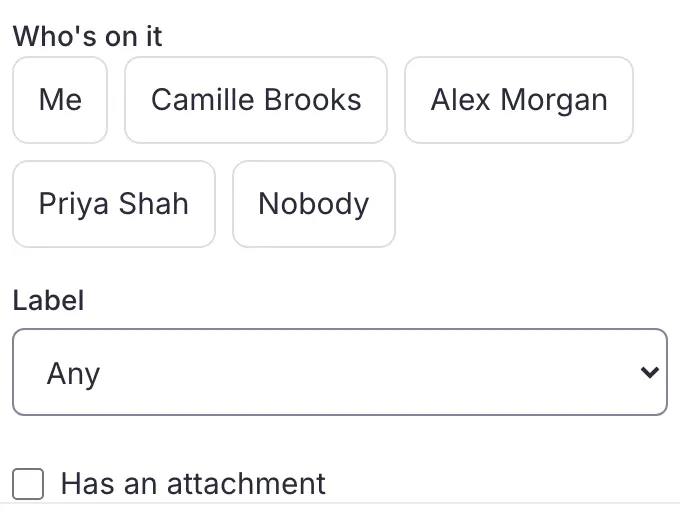
Find any conversation
In detail
Everything this covers.
Every plan includes all of it, whatever the size of your team. See pricing
- Gmail labels, Outlook categoriesKeep your Gmail labels and Outlook categories as they are, and add, remove or create them from Trupeo
- Labels on IMAPLabel emails on an IMAP mailbox too: Trupeo keeps the labels and copies them to the server when it can
- Outlook and IMAP foldersOn Outlook and IMAP, move emails into your folders, one at a time or in bulk, and manage your folders from Trupeo
- Trash and spamMove a conversation or a single email to the trash and restore it; the Spam view shows what your email provider filed as spam
- Report spamReport a conversation as spam, or as not spam from the Spam view: Trupeo moves it at your email provider too
- Quick searchSearch with a few words
- Sender, recipient, subjectFilter by sender, recipient or subject
- Words and attachmentsInclude or leave out words, and search for an attachment's name
- Date, state, who is on itRefine by date, attachment, state or who's on it
- By labelFind every email that carries a label
Questions
Questions about labels and folders.
What teams ask before they connect their mailbox.
Is a label put on in Trupeo also put on in Gmail?
Yes. A label put on in Trupeo is put on in Gmail, on every email of the conversation, and the other way round. On Outlook, labels are your Outlook categories.
Labels
What is the difference between a label and a folder?
A label says what a conversation is about, and a conversation can carry several. A folder is where an email sits, on Outlook and IMAP. A label never moves an email.
Folders
Are there folders on a Gmail mailbox?
No: on Gmail, labels play that part, as they do in Gmail itself.
Can I file many emails at once?
Yes. Select several emails and label them, move them to a folder, hand them over or mark them done in one go, then undo if needed.
Keep going
The other features.
Ready to make your shared inbox simple?
Connect your current address and bring your team together. Nothing to install: Trupeo opens in the browser.
- No credit card
- No commitment
- You keep your address