
Contacts
One address book for the whole team. And groups to write to.
It fills itself from your emails and keeps what the team knows about each contact. Write to your members, the parents or the volunteers in one go, without anyone seeing the others' addresses.
- No credit card
- Keep your address and your emails
- From €10 a month per mailbox, excl. VAT
How it works
Who's who, shared by everyone.
It fills itself
The people you exchange emails with appear in it on their own. Add phones, addresses, a birthday, and the fields your organization needs.
Write to a group
Put contacts in groups and add a group as one recipient: it moves to Bcc, so nobody sees the others' addresses.
Up to date everywhere
Keep contacts and groups up to date with Google Contacts or Outlook, both ways, and bring in a CSV or vCard file.
Up close
What it looks like in Trupeo.
Real Trupeo screens. The people, the emails and the association are invented.
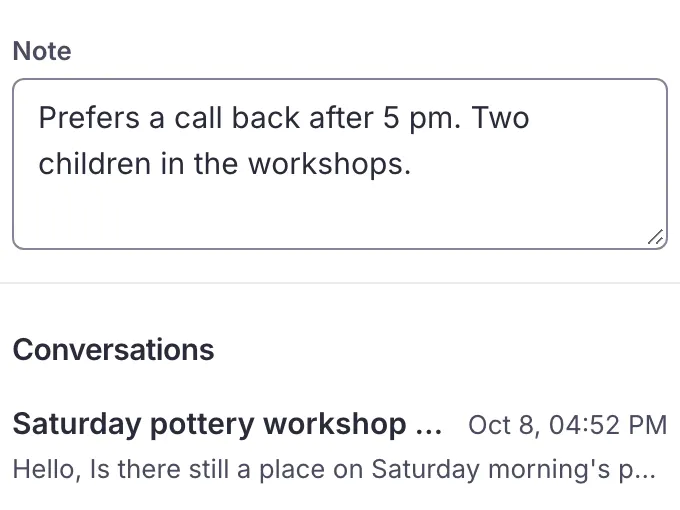
Notes on every contact
A shared address book that fills itself, with the team's notes on each contact.
In detail
Everything this covers.
Every plan includes all of it, whatever the size of your team. See pricing
- Shared address bookShare an address book that fills itself, with your notes on a contact shown on every conversation with them
- Details and fieldsKeep phones, addresses, birthday, company and website on each contact; the owner adds the fields your organization needs, and any member adds other details
- Groups in BccPut contacts in groups and write to a group as one recipient: added in To, it moves to Bcc, so nobody sees the others' addresses (up to 500 recipients, 100 on an IMAP mailbox)
- Up to date with Google and OutlookKeep contacts and groups up to date with Google Contacts or Outlook, both ways: the owner switches it on for a mailbox connected through Google or Microsoft, except a Microsoft shared mailbox
- Duplicates to mergeSee the contacts that look like the same person and merge them, after a preview
- Removed contacts, 30 daysA removed contact stays 30 days in Removed contacts, where you can restore it
- Import and exportImport contacts from a CSV or vCard file, Google and Outlook exports included; the owner can export them as vCard or CSV
Questions
Questions about contacts.
What teams ask before they move their address book.
How many people can I write to with a group?
Up to 500 recipients per email, 100 on an IMAP mailbox. The group goes in Bcc, so nobody sees the others' addresses.
Contacts and groups
Do my contacts stay in Google Contacts or Outlook?
Yes. The owner can keep contacts and groups up to date with Google Contacts or Outlook, both ways, for a mailbox connected through Google or Microsoft. It is not offered for a Microsoft shared mailbox or an IMAP mailbox.
Can I bring in an existing list?
Yes. Import a CSV or vCard file, Google and Outlook exports included. The owner can export the contacts as vCard or CSV.
What if I remove a contact by mistake?
It stays 30 days in Removed contacts, where you can restore it. Contacts that look like the same person can be merged after a preview.
Tidy up your contacts
Keep going
The other features.
- Share out the emailsWho's on each email, and nothing answered twice
- ReplyFrom the shared address, with templates and signatures
- AI assistantsClaude or ChatGPT, with your rights and nothing more
- Labels and foldersYour labels, folders and search, kept as they are
- All featuresEverything Trupeo does, chapter by chapter
Ready to make your shared inbox simple?
Connect your current address and bring your team together. Nothing to install: Trupeo opens in the browser.
- No credit card
- No commitment
- You keep your address